







16 Billion Passwords Leaked – A Deep Dive into the Google and Global Credentials Breach
Introduction
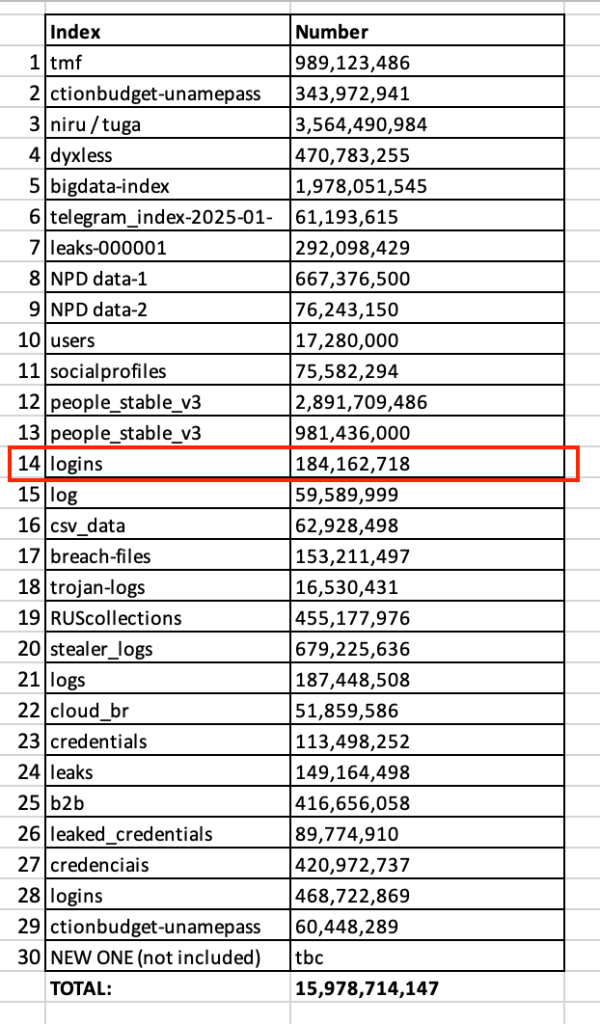
In June 2025, cybersecurity researchers uncovered one of the largest data breaches in history—16 billion login credentials from platforms like Google, Apple, Facebook, GitHub, and government services were exposed online. The leak, discovered by Cybernews, consists of 30 separate datasets containing stolen usernames, passwords, and authentication tokens, likely harvested by infostealer malware over time.
This breach is particularly alarming because it provides cybercriminals with a “blueprint for mass exploitation,” enabling account takeovers, identity theft, and phishing attacks on an unprecedented scale. While Google and other tech giants confirmed no direct breach of their systems, Google Passwords Leaked datasets include credentials from users who logged into these services—meaning millions of accounts are still at risk.
In this article, we’ll explore:
1. How the breach happened
2. Why it’s worse than previous leaks
3. Which platforms are most affected
4. How to check if your data was exposed
5. Critical steps to protect yourself
How Did the 16 Billion Password Leak Happen?
Unlike traditional data breaches where hackers infiltrate a single company’s database, this leak is a compilation of multiple credential dumps stolen via:
- Infostealer Malware – Hackers use malicious software (like Redline, Vidar, or Raccoon) to steal login details from infected devices. These logs often include browser-saved passwords, cookies, and session tokens,
- Credential Stuffing Attacks – Cybercriminals take leaked passwords from past breaches and test them across multiple sites, exploiting users who reuse passwords,
- Repackaged Leaks – Old breaches are combined with new data, making it harder to track the origin.
The datasets were briefly exposed on unsecured Elasticsearch servers and cloud storage, allowing researchers (and potentially criminals) to access them before being taken down.
Why This Breach Is More Dangerous Than Previous Leaks
- Fresh & Weaponized Data
- Unlike older breaches (like RockYou2024), much of this data is recent, meaning passwords and session tokens may still be active.
- Cybercriminals can use cookies and authentication tokens to bypass two-factor authentication (2FA), making accounts vulnerable even after password changes.
- Unprecedented Scale
- 16 billion records means nearly two passwords per person on Earth—indicating massive credential reuse.
- The leak includes government portals, corporate logins, and financial services, increasing risks beyond social media.
- No Single Source – Harder to Mitigate
- Since the data comes from multiple infostealers and breaches, there’s no way to fully track exposure.
- Companies like Google and Apple weren’t directly hacked, so they can’t force password resets for affected users.
Which Platforms Are Most Affected?
While no company suffered a direct breach, the leaked credentials include logins for:
- Google (Gmail, Drive, YouTube)
- Apple (iCloud, App Store)
- Facebook & Instagram (Meta)
- GitHub, Telegram, Microsoft
- Banking, VPN, and government portals
Researchers found that some datasets were region-specific, such as:
- A 3.5 billion-record dump linked to Portuguese-speaking users.
- A 455 million-record set tied to Russian Federation services.
How to Check If Your Google (or Other) Passwords Were Leaked
- Use “Have I Been Pwned” (https://haveibeenpwned.com)
- Enter your email to see if it appears in known breaches.
- Google Password Manager (for Chrome users)
- Google’s built-in tool alerts you if saved passwords were exposed.
- Dark Web Monitoring Services
- Paid services like LifeLock or Experian scan for leaked credentials.
6 Critical Steps to Protect Yourself
1. Change Compromised Passwords Immediately
- If your email appears in a breach, update passwords for all linked accounts.
- Use strong, unique passwords (16+ characters, random mixes).
2. Enable Multi-Factor Authentication (MFA)
- Avoid SMS-based 2FA (vulnerable to SIM swaps).
- Use authenticator apps (Google Authenticator, Authy) or hardware keys.
3. Switch to Passkeys (Google’s Recommended Solution)
- Passkeys replace passwords with biometric/facial login, making them phishing-resistant.
- Google, Apple, and Microsoft now support passkeys.
4. Use a Password Manager
- Tools like Bitwarden, 1Password, or Keeper generate and store strong passwords securely.
5. Monitor Accounts for Suspicious Activity
- Check login alerts for Google, Facebook, and banking apps.
- Freeze your credit if financial data was exposed.
6. Scan Devices for Infostealers
- Run antivirus scans (Malwarebytes, Norton) to detect keyloggers.
- Avoid pirated software and phishing emails, common infection sources.
Conclusion: The Future of Cybersecurity
This breach proves that passwords alone are no longer secure. Companies like Google are pushing for passwordless authentication (passkeys), but user adoption remains slow.
For businesses, employee training and endpoint security are critical—many breaches start with infected employee devices 2. For individuals, vigilance and proactive security measures are the best defense.
Final Takeaway:
- Assume your passwords are already leaked.
- Adopt passkeys and password managers.
- Never reuse credentials across sites.
By taking these steps, you can significantly reduce risks in an era where data breaches are the new normal.
Sources & Further Reading
- Cybernews Report on 16B Leak
- Google’s Push for Passkeys
- How Infostealers Work
- Have I Been Pwned Checker
Ace Encoders Global | Stay Secure, Stay Informed
For more cybersecurity insights, visit our blog at Ace Encoders Global.